
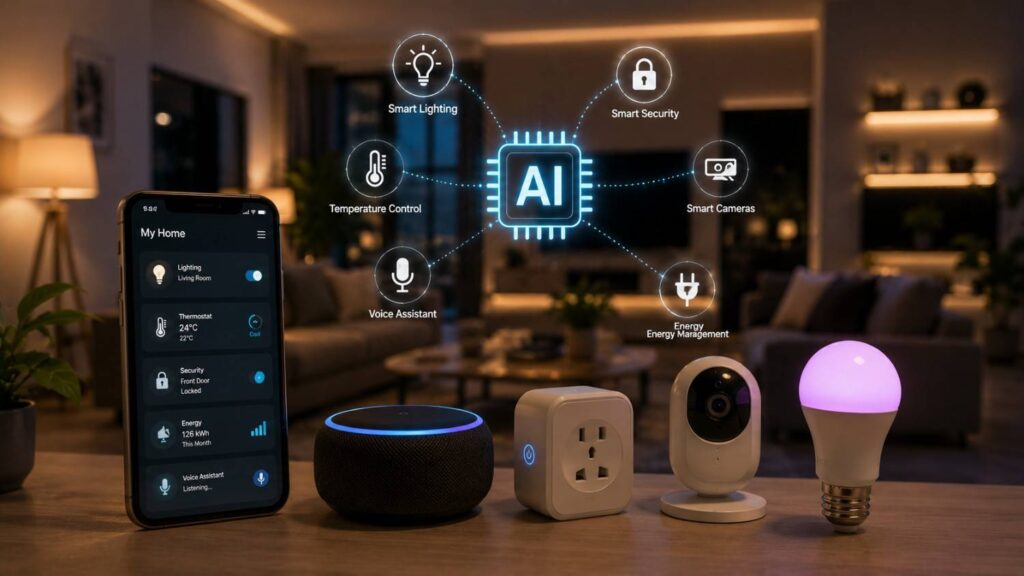
The Role of AI in Smart Home Devices
Smart-home technology began with remote controls, mobile applications, timers, and simple sensor triggers. Artificial intelligence adds a more interpretive layer. AI-enabled devices can classify activity, recognize patterns, understand natural-language instructions, generate recommendations, and adjust selected settings according to sensor information and previous household behavior.
This distinction matters because not every connected product uses AI. A Wi-Fi plug that turns off at a scheduled time is automated, but it may not analyze data or learn anything. A thermostat that detects repeated adjustments and recommends a schedule uses a form of pattern recognition. A camera that separates a person, animal, package, or vehicle from general movement applies computer-vision techniques.
AI can improve convenience, energy awareness, security notifications, accessibility, and control across several devices. It can also create new problems. A system may misunderstand a command, classify an event incorrectly, infer the wrong preference, or collect more information than the household expects.
The most useful systems therefore combine intelligent features with clear permissions, manual controls, transparent privacy settings, and dependable basic functionality. Residents should know what information a device analyzes, where that information is processed, how long it is stored, and how automated actions can be changed or stopped.
The NIST AI Risk Management Framework encourages organizations to consider reliability, transparency, security, privacy, and other trustworthiness characteristics throughout the AI lifecycle. Those principles are directly relevant to connected homes because automated decisions can affect comfort, household routines, access, surveillance, and personal safety.
How Does AI Work Inside a Smart Home?
An AI-enabled smart home combines physical devices, environmental sensors, software models, network connections, home platforms, and automation rules. Each component has a different responsibility. Sensors observe the environment. Devices perform actions. AI software interprets selected inputs. The platform coordinates permissions and device states, while the resident decides which recommendations or automations should be active.
The process usually begins with data collection. A thermostat receives temperature and occupancy information. A camera receives video and possibly audio. A speaker receives a voice request. An energy monitor records electricity use. The system converts those inputs into a form that software can evaluate.
A machine-learning model may classify an event, identify a repeated pattern, estimate the likelihood of occupancy, or convert speech into an actionable instruction. The output may become a notification, recommendation, summary, or trigger for a separate automation rule.
The intelligence may run locally, in a household hub, through a cloud service, or across several locations. Each design creates different performance, privacy, and reliability characteristics.
AI also needs accurate context. A model may know that motion occurred but still need information about time, room, household status, device permissions, and current lighting conditions before recommending an action.
The strongest systems separate interpretation from authority. AI can provide context, but explicit policies determine what the system is permitted to control. This makes automated behavior easier to understand, test, and correct when household needs change.
Sensors, Models, and Household Context
Sensors provide the raw information used by intelligent home systems. Common inputs include temperature, humidity, light level, motion, sound, energy consumption, air quality, door status, device state, and the presence of connected phones or wearable devices.
A machine-learning model evaluates those inputs for a defined purpose. A camera model may classify an object. A voice model may convert speech into text and identify the user’s intent. A thermostat algorithm may compare temperature adjustments across several days and identify a recurring preference.
The result is not always a direct action. It may be a confidence score, event label, recommendation, or summary that another part of the platform uses.
Context determines whether the result is useful. Motion in a hallway during daylight may require no response, while the same event after dark could support a lighting routine. A temperature adjustment made during a temporary illness should not necessarily become a permanent schedule.
Advanced systems therefore combine model output with time, room, device state, occupancy, and user-defined limits. Even then, household behavior is complex. Visitors, changing work patterns, travel, seasons, and personal preferences can make past data a poor guide to future needs. Editable rules and manual correction remain essential.
Local Processing Versus Cloud Processing
Local processing occurs on the device itself or through a hub inside the home. A camera may classify an event without uploading the complete video stream, or a speaker may recognize a limited command locally. This can reduce response time and limit the amount of raw data transmitted outside the property.
Apple provides on-device machine-learning frameworks for functions such as image analysis, natural-language processing, and sound classification. These frameworks demonstrate that meaningful intelligence can run on consumer hardware when the model and device have sufficient capability.
Cloud processing sends selected information to remote infrastructure. Cloud services can support larger models, more complex language understanding, cross-device history, remote access, and faster feature updates. However, they may depend on a stable internet connection and involve transferring information outside the home.
Many products use a hybrid design. A wake word or basic event may be recognized locally, while a complex request is processed remotely. Some camera analysis may occur on the device, while summaries and history are stored in the cloud.
Consumers should not assume that “local” means no data ever leaves the property or that “cloud” means every recording is permanently stored. The correct approach is to review the product’s technical documentation, privacy settings, offline behavior, and retention controls.
| Feature | Local (Edge) AI Processing | Cloud AI Processing | Hybrid Approach |
|---|---|---|---|
| Data Processing | Happens directly on the device | Processed on remote servers | Uses both local and cloud resources |
| Internet Dependency | Often works offline | Usually requires an internet connection | Essential features may work offline while advanced AI uses the cloud |
| Response Speed | Faster for real-time tasks | May experience slight network delay | Balances speed with advanced functionality |
| Privacy | More data stays inside the home | Data is transmitted to cloud services | Sensitive tasks can remain local while complex AI runs in the cloud |
| Best Use Cases | Smart locks, occupancy detection, lighting automation | Voice assistants, AI image recognition, conversational AI | Modern smart-home ecosystems combining local control with cloud intelligence |
AI, Platforms, and Device Interoperability
AI becomes more useful when the home platform can understand device types, rooms, states, permissions, and available actions. A thermostat, light, lock, sensor, and camera may come from different manufacturers, but the platform needs a consistent way to identify what each product can do.
Apple HomeKit provides a shared framework for organizing and controlling compatible accessories. Amazon Alexa and Google Home similarly coordinate supported devices, routines, voice control, and household access across their respective ecosystems.
Matter improves basic interoperability through an IP-based application standard for compatible products. It can allow supported devices to work across more than one ecosystem and provide a common foundation for functions such as switching, sensing, or temperature control.
Matter does not standardize every AI feature. A camera may support basic Matter functionality while keeping advanced event recognition inside the manufacturer’s application. A thermostat may expose temperature control to several platforms but reserve detailed learning reports for its own service.
In practical terms, Matter can create a more consistent device layer, while AI operates above or beside that layer. Buyers should check both forms of compatibility: whether the device can be controlled through the chosen platform and whether the desired intelligent feature remains available there. A product may be technically connected without providing the same experience in every application.
Where Does AI Deliver the Most Value?
AI creates the greatest value when it interprets information that would be difficult or time-consuming for residents to evaluate manually. A fixed schedule can turn a device on or off, but it cannot necessarily decide whether a camera event is important, whether a temperature pattern reflects a preference, or whether a spoken request involves several connected products.
The most useful applications generally fall into three groups. The first is pattern recognition, where the system identifies repeated behavior and recommends a schedule or setting. The second is event classification, where software separates relevant activity from ordinary background changes. The third is natural-language interpretation, where a resident describes an intended outcome instead of programming each device manually.
AI can also organize information. A connected home may produce hundreds of sensor readings and device events every day. Intelligent summaries can help residents focus on unusual or actionable changes rather than reviewing every individual notification.
Value should still be measured against accuracy, privacy, cost, and complexity. A feature that saves a few seconds but requires continuous cloud recording may not suit every household. A camera classification system that generates frequent false alerts may create more work instead of reducing it.
The table below summarizes common uses and their trade-offs. It should be treated as a decision guide rather than a promise that every product performs these functions equally well.
| Smart-Home Area | Information Analyzed | AI Function | Potential Benefit | Main Concern |
|---|---|---|---|---|
| Climate control | Temperature, occupancy, adjustments | Preference and schedule learning | Comfort and energy management | Incorrect assumptions |
| Security cameras | Video, motion, selected sounds | Event classification and description | More relevant alerts | Privacy and false positives |
| Voice control | Spoken requests and device states | Language interpretation | Easier control and accessibility | Misunderstood commands |
| Lighting | Presence, time, ambient conditions | Context-aware recommendations | Convenience and reduced waste | Unexpected activation |
| Energy management | Device use and electricity patterns | Forecasting and optimization | Better consumption awareness | Incomplete or inaccurate data |
Climate Control and Energy Management
Learning thermostats are one of the most established examples of machine learning in smart homes. A supported thermostat may compare repeated manual temperature changes, occupancy information, and time patterns to propose or create a schedule.
Google’s documentation explains that certain Nest thermostats use weighted pattern recognition to learn from adjustments. Presence-based features can also move the system toward energy-saving settings when the household appears to be away.
The larger opportunity comes from combining climate control with weather conditions, room use, utility pricing, and building characteristics. A system may recommend preheating, precooling, or reducing unnecessary operation during an unoccupied period.
Energy claims still require careful evaluation. ENERGY STAR-certified smart thermostats must demonstrate energy savings using field data from real homes. This provides stronger evidence than a general marketing statement that a product uses AI.
Results will vary according to climate, HVAC equipment, insulation, household schedules, comfort preferences, and previous thermostat behavior. A well-insulated home with an efficient schedule may have less room for improvement.
AI should therefore support informed energy management rather than impose one definition of efficiency. Residents need clear reports, editable schedules, manual controls, and an understanding of why the system recommends a particular change.
Security Cameras and Event Recognition
Traditional motion detection can generate notifications for shadows, rain, insects, moving branches, passing vehicles, and changes in lighting. AI-enabled cameras attempt to reduce this noise by classifying objects, movements, or selected sounds.
A system may distinguish a person from general motion, recognize a package near a doorway, or provide a short description of an event. Google’s supported camera documentation describes AI-generated event descriptions and more detailed notifications for certain devices and services.
These capabilities can make alerts more useful, but classification is not guaranteed to be correct. Camera angle, distance, darkness, glare, weather, obstructions, image quality, and model limitations can all affect the result.
False positives create unnecessary concern, while false negatives may prevent an important notification. Users should therefore treat event labels as assistance for reviewing activity rather than unquestionable evidence.
Privacy must also be considered. A camera that provides detailed recognition may process highly sensitive information about household members, visitors, neighbors, workers, and passersby.
Placement should be limited to areas where surveillance is appropriate and lawful. Residents should review recording zones, microphone settings, cloud retention, household access, and notification permissions. AI can make camera alerts more relevant, but it does not remove the need for careful installation and responsible oversight.
Voice Control, Accessibility, and Routines
Natural-language AI can reduce the need to remember precise device names or command structures. A resident may describe an intended outcome, such as preparing the living room for a film, instead of issuing separate instructions for the lights, television, blinds, and temperature.
Google’s Gemini for Home documentation describes conversational control, home-status questions, follow-up interaction, and tools that can turn a natural-language request into a draft automation. Amazon Alexa routines can combine voice, time, location, and device triggers within supported configurations.
These capabilities can improve accessibility for people who have limited mobility, difficulty using touchscreens, or visual impairments. Voice control may also help residents operate several devices without moving between multiple applications.
However, language systems can misunderstand accents, names, background speech, incomplete instructions, or references such as “that light.” Household permissions also matter. A child, visitor, or television program should not be able to perform a sensitive action unintentionally.
Critical controls should therefore require appropriate confirmation or remain unavailable through general voice requests. Physical switches, mobile applications, and manual device controls should remain functional.
The best voice system makes ordinary tasks easier without making the household dependent on perfect speech recognition or continuous cloud availability.
What Benefits Can AI Bring to Smart Homes?
The strongest benefits of AI appear when the system reduces repetitive work, highlights useful information, or makes connected devices easier to control. A successful implementation should feel simpler than the manual process it replaces. When residents spend more time correcting automations than benefiting from them, the system is not delivering meaningful intelligence.
Personalization is one advantage. A device can adapt selected recommendations according to repeated behavior rather than requiring the resident to configure every schedule manually. AI can also summarize complex information, such as camera activity, energy use, or device status, into a more understandable form.
Accessibility is another important benefit. Natural-language control, automatic routines, and context-aware interfaces may help people who find conventional switches, applications, or small screens difficult to use.
AI can also support proactive maintenance. Connected appliances and systems may identify unusual operating patterns or recommend an inspection before a failure becomes obvious. The usefulness of these alerts depends on the quality of the underlying sensors and model.
Benefits should still be assessed carefully. Automation may suit one resident while frustrating another. An energy-saving recommendation may conflict with comfort, health, or accessibility needs. A security alert may provide awareness without proving that a threat exists.
Residents should be able to understand, edit, and disable intelligent features. The purpose of AI is not to make every decision automatically. It is to provide better information and reduce unnecessary effort while keeping the household in control.
Personalization and Reduced Daily Effort
AI can adapt selected features according to recurring household behavior. A thermostat may recognize common temperature changes. A camera system may provide more descriptive notifications. A voice assistant may interpret a request involving several devices instead of requiring separate commands.
Personalization is most useful when it remains visible and editable. Residents should be able to review learned schedules, inspect automation triggers, and remove assumptions that no longer reflect daily life.
Household routines change frequently. Work schedules shift, children grow, visitors arrive, seasons change, and residents may temporarily adjust settings because of illness or travel. A model trained on past behavior can become inaccurate when the context changes.
I recommend beginning with low-risk uses such as lighting suggestions, notification filtering, or climate recommendations. This gives the household an opportunity to evaluate accuracy before enabling broader automation.
A broader look at how an AI-powered home adapts everyday routines also highlights the growing role of intelligent automation in improving convenience and user experience.
The system should also account for more than one resident. A schedule that matches one person’s preference may conflict with another person’s comfort or accessibility needs.
Good personalization reduces configuration work without hiding how decisions are made. The resident should understand why a recommendation appeared and what information influenced it. AI should offer a useful starting point, while the household retains authority over the final routine.
Better Awareness and Energy Control
A connected home can generate a large volume of information. Door sensors, thermostats, cameras, plugs, appliances, lights, and environmental monitors may produce hundreds of events that would be impractical to review individually.
AI can organize those events into summaries, priorities, and recommendations. It may highlight an unusual temperature change, a door left open, repeated equipment operation, or a camera event that appears more relevant than ordinary motion.
Energy tools can help residents understand when heating, cooling, lighting, or appliances are operating unnecessarily. A system may compare use across time periods or identify a recurring peak.
These features support awareness, but they do not guarantee lower bills. Energy outcomes depend on building insulation, equipment efficiency, utility pricing, local climate, occupancy, and the resident’s willingness to act on recommendations.
Incomplete data can also create misleading conclusions. A smart plug measures only the appliance connected to it, while a thermostat may not understand heat loss from an open window.
Independent certification and transparent reporting provide stronger evidence than broad AI claims. Residents should look for understandable energy histories, editable settings, and clear explanations of what is being measured.
The best system gives users useful information without overwhelming them with technical detail or presenting uncertain estimates as precise facts.
Related Articles
What Are the Risks and Limitations?
AI-enabled smart homes process information from highly private environments. Cameras, microphones, occupancy sensors, thermostats, locks, energy monitors, and appliances can reveal when people are home, which rooms they use, how they move through the property, and what routines they follow.
The first major risk is privacy. Residents may not understand what information is collected, whether it is stored locally, how long it remains in the cloud, or which household members and external services can access it.
The second risk is cybersecurity. A device may be protected by secure hardware but connected through a weak account or outdated router. Security depends on the complete system rather than one feature.
The third limitation is accuracy. AI models can misunderstand speech, misclassify video, infer the wrong preference, or fail under conditions that differ from their training data.
Reliability creates another concern. A cloud-dependent feature may become unavailable during an outage or after a manufacturer changes its service. Subscription requirements and discontinued support can also reduce long-term value.
Finally, too much automation can make a home difficult to understand. Residents may no longer know which sensor or rule caused an action, creating frustration or safety concerns.
These limitations do not mean AI should be avoided. They mean intelligent features should be introduced gradually, evaluated against a clear household need, and supported by manual controls, secure accounts, transparent settings, and a realistic plan for maintenance.
Privacy and Household Data
Smart-home information can reveal detailed patterns about everyday life. Temperature changes may indicate occupancy. Camera recordings can show residents, visitors, workers, and neighbors. Voice assistants may receive private conversations near the activation point.
The FTC recommends evaluating privacy before installing internet-connected cameras, particularly when they show sensitive areas. It advises consumers to verify encryption and tightly control the accounts and devices that can view camera feeds remotely.
Residents should review what information is collected, where it is processed, and how long it is retained. Camera history, voice activity, energy reports, presence information, and automation logs may each have separate controls.
Google’s documentation, for example, provides options for reviewing, deleting, disabling, or changing retention settings for certain Gemini for Home activities.
Household access also deserves attention. A former resident, installer, guest, or family member may retain permissions unless the account owner removes them.
Avoid placing cameras or microphones where people have a strong expectation of privacy. Consider the rights of visitors and workers as well as permanent residents.
Data minimization is a useful principle. Enable only the collection needed for the desired function. A smart home should not record more information simply because storage and AI analysis are available.
Cybersecurity and Account Protection
An AI feature does not make an Internet of Things product secure. Protection depends on the device hardware, firmware, mobile application, router, cloud service, account recovery system, and manufacturer’s maintenance practices.
NIST’s consumer IoT guidance identifies cybersecurity capabilities that connected products commonly need. These include device identification, configuration, data protection, controlled access, software updates, and clear communication from the manufacturer.
The FTC recommends securing the home router, changing default passwords, installing updates, and enabling two-factor authentication when available. These basic steps protect the broader environment in which AI-enabled devices operate.
Use unique passwords for major smart-home accounts. Reused credentials can allow a breach of one unrelated service to expose cameras, locks, or household controls.
Review the router’s connected-device list and remove products that are no longer used. A separate guest or IoT network may provide additional isolation when supported.
Update devices and applications promptly. If a manufacturer stops providing security fixes, the product may eventually need to be disconnected or replaced.
Recovery settings matter as well. Confirm that account-recovery email addresses and phone numbers belong to current household administrators.
Cybersecurity is an ongoing maintenance responsibility. A device that was secure at installation may become vulnerable if updates, permissions, and accounts are ignored for several years.
Mistakes, Over-Automation, and Safety
AI systems can misunderstand speech, classify an event incorrectly, or learn a preference that does not reflect current household needs. Generative assistants can also produce confident responses that are incomplete or inaccurate.
These limitations become more serious when the system controls locks, alarms, cooking equipment, heating devices, or other functions that could cause physical harm. Google warns that Gemini-connected home controls are designed for convenience and should not be relied upon for safety- or security-critical requests.
Sensitive actions should require clear authorization, confirmation, or manual control. A spoken instruction should not create an irreversible security change merely because the system believes it understood the request.
Over-automation can also make ordinary tasks confusing. A light may switch off because of a presence assumption, while a resident believes the bulb has failed. Several overlapping routines may repeatedly reverse one another.
Every automation should have a clear trigger, action, and override. Household members should understand how to stop it without accessing an administrator account.
Test intelligent features under realistic conditions. Include visitors, changed schedules, denied permissions, internet outages, weak Wi-Fi, and unexpected sensor activity.
A predictable home is usually safer than a highly automated system whose behavior cannot be explained. AI should reduce effort while preserving understandable, dependable manual operation.
How Should You Choose and Set Up AI Smart-Home Devices?
A good purchasing process begins with the household problem rather than the AI label. Decide whether you need better temperature management, more relevant camera alerts, easier voice control, improved energy information, or greater accessibility. A specific goal makes it easier to compare products and reject features that do not provide practical value.
The next step is compatibility. Choose a primary smart-home platform and confirm that the device supports it. Determine whether you need a hub, bridge, subscription, compatible speaker, or particular account type.
Privacy and security should be evaluated before purchase. Read the manufacturer’s explanation of data collection, local processing, cloud storage, software updates, account protection, and support duration.
Also examine total ownership cost. Some advanced camera summaries, cloud recordings, conversational assistants, or energy reports may require ongoing subscriptions. A low purchase price can become expensive when useful functionality depends on several years of payments.
The device’s ordinary functionality matters as well. A thermostat should still provide clear manual temperature control. A light should still operate when an intelligent recommendation is incorrect. A camera should still offer understandable basic alerts.
Install devices gradually. Adding one product at a time makes connection, privacy, and automation problems easier to diagnose.
Finally, treat setup as the beginning of maintenance rather than the end. Review accounts, updates, permissions, retention settings, and household access periodically. A dependable AI-powered smart home requires continued oversight.
Check Compatibility and Core Functionality
Choose one primary platform for daily device control, routines, household access, and voice interaction. This does not require every product to come from one manufacturer, but it gives residents a consistent way to manage the home.
Confirm that each product supports the selected ecosystem and that the required feature is available through it. A device may support basic switching in several platforms while keeping advanced AI functions inside its own application.
Matter certification can improve interoperability for supported device types. Multi-admin capabilities may also allow compatible accessories to work with more than one ecosystem. However, Matter does not guarantee that every manufacturer-specific AI feature will transfer between platforms.
Check hardware requirements as well. Some devices need a bridge, Matter controller, Thread Border Router, or compatible speaker. Others depend only on Wi-Fi.
One thing I always check first is what the product can do without AI. Basic operation should remain reliable when the model makes a poor recommendation, the internet connection fails, or a subscription ends.
Review electrical, mounting, HVAC, network, and environmental requirements before purchasing. A sophisticated model cannot compensate for weak Wi-Fi, incorrect wiring, or unsuitable camera placement.
Compatibility should include the household, not only technology. Every resident should have an understandable way to operate essential devices without learning a complex set of commands.
Review Privacy, Security, and Support
Before purchasing, identify what information the product collects. Look for explanations covering video, audio, occupancy, device identifiers, location, energy use, account activity, diagnostics, and interactions with third-party services.
Check whether analysis occurs locally, in the cloud, or through a hybrid process. Determine which features remain available offline and whether recordings or activity histories can be deleted.
Review account protections. Strong products should support unique credentials, secure recovery, multi-factor authentication where appropriate, encrypted communication, and controlled household permissions.
Manufacturer support is equally important. Look for a clear software-update process, vulnerability-reporting information, and reasonable communication about the product’s supported lifetime.
NIST’s consumer IoT guidance treats technical capabilities and manufacturer support as connected parts of a securable product. A device cannot remain secure indefinitely when the company provides no updates or end-of-life information.
Examine recurring fees. Advanced camera recognition, cloud history, AI summaries, or conversational features may require a subscription. Compare the multi-year cost with the value of those functions.
Read the privacy policy and support documentation rather than relying only on retail descriptions. Marketing pages emphasize benefits, while technical documents are more likely to explain requirements and limits.
A trustworthy product should make its data practices, security controls, and service dependencies understandable before the customer installs it.
| Buying Factor | Why It Matters | What to Check Before Purchase |
|---|---|---|
| Platform Compatibility | Ensures devices work together | Support for Google Home, Apple HomeKit, Alexa, or Matter |
| Privacy Controls | Protects personal household data | Data collection settings, recording controls, retention options |
| Security Features | Reduces cybersecurity risks | Multi-factor authentication, encrypted communication, automatic updates |
| AI Capabilities | Determines actual smart features | Learning automation, voice intelligence, event recognition |
| Offline Functionality | Maintains usability during internet outages | Local control and manual operation availability |
| Long-Term Support | Extends product lifespan | Firmware updates, security patches, manufacturer support period |
| Subscription Costs | Affects total ownership cost | Monthly fees for AI features, cloud storage, or premium services |
Follow a Controlled Setup Process
Install AI-enabled devices through a staged process so each permission and feature can be evaluated separately.
- Update the router and replace default administrative credentials.
- Create a unique password for the smart-home platform.
- Enable multi-factor authentication where available.
- Install one device and apply all firmware updates.
- Confirm basic manual control before enabling AI features.
- Review camera, microphone, presence, and activity-retention settings.
- Enable one intelligent feature at a time.
- Test notifications, recommendations, and automation behavior.
- Add household members with the minimum permissions they need.
- Review access, updates, subscriptions, and activity periodically.
Begin with low-risk functions. A lighting suggestion or energy summary is easier to evaluate than an AI-controlled lock or heating appliance.
Test the system under normal and unusual conditions. Disconnect the internet, deny a permission, change a schedule, and verify that essential controls remain available.
Give devices clear names and organize them by room. This reduces mistakes in voice commands and automation rules.
Document unusual setup requirements and account ownership. This information is useful when changing routers, replacing phones, moving home, or transferring control.
A controlled process prevents a new device from receiving broad access before residents understand its behavior. It also creates a clear baseline for identifying future problems.
Quick Answer About The Role of AI in Smart Home Devices
AI helps smart-home devices interpret information rather than simply follow fixed commands. It can analyze temperature adjustments, occupancy signals, video events, spoken instructions, energy use, and device states. The system may then classify an event, recommend a routine, summarize household activity, or adjust a setting within the permissions selected by the resident.
Common examples include learning thermostats, camera-event recognition, conversational voice control, robot navigation, appliance diagnostics, and energy-management recommendations. These functions can reduce repetitive tasks and make connected homes more accessible to people who find conventional switches, menus, or mobile interfaces difficult to use.
However, AI does not make a device automatically accurate, secure, private, or reliable. Models can make mistakes. Cloud-based services may become unavailable. Product features may require subscriptions, and manufacturers may discontinue support.
Consumers should therefore evaluate the complete product rather than the AI label. Important questions include what data is collected, whether processing occurs locally or remotely, how updates are delivered, and what functions remain available without an internet connection.
Strong router security, unique account passwords, multi-factor authentication, current firmware, and carefully managed household permissions remain essential. AI should improve a dependable smart-home device, not compensate for poor security, weak compatibility, or confusing manual controls.
How Is AI Different From Basic Automation?
Basic automation follows a predefined rule. A lamp switches on at sunset, a thermostat lowers its temperature at bedtime, or a door sensor sends a notification whenever it opens. The action is predictable because the user or installer has defined the trigger and result in advance.
AI performs a different role. It can interpret less structured information, identify a pattern, estimate the meaning of an event, or recommend a response. A camera may distinguish a person from general motion. A thermostat may compare repeated manual changes and propose a schedule. A voice system may convert an ordinary sentence into several device actions.
Many products combine both methods. AI may identify or recommend an event, while a conventional automation engine executes the final routine. For example, a model might estimate that the household is away, but an explicit rule determines which lights and climate settings change.
This combined design is often more dependable than giving a model unrestricted control. Residents receive useful interpretation and personalization while retaining predictable rules, editable schedules, and manual overrides. The most important distinction is therefore not whether the product contains AI, but what decisions the model makes and how much control the user keeps.
For readers interested in additional real-world applications, this overview of AI smart home systems provides practical examples of how machine learning extends beyond traditional rule-based automation.
Which Devices Commonly Use AI?
Artificial intelligence appears in several smart-home categories. Learning thermostats may analyze repeated temperature adjustments and occupancy patterns. Security cameras and video doorbells can classify motion events. Speakers and displays use speech recognition and natural-language processing to interpret requests and answer questions.
Robot vacuums may use sensors, mapping, and obstacle recognition to navigate a property. Lighting systems can combine presence, ambient light, and time information to recommend routines. Appliances may use pattern recognition for cycle selection, maintenance alerts, or energy-management features.
Google’s home documentation describes conversational control, camera-event summaries, natural-language automation creation, and home-status questions within supported products and services. Availability may vary by hardware, account type, language, region, and subscription.
Not every feature advertised as intelligent uses an advanced machine-learning model. Some products rely on ordinary thresholds or predefined rules while using “AI” as broad marketing language.
Buyers should therefore ask what the device actually analyzes and produces. A useful description should identify the input, the model’s task, the resulting action, and the user’s ability to review or disable it. Specific capabilities are more meaningful than an unsupported claim that a device is simply AI-powered.
Frequently Asked Questions About The Role of AI in Smart Home Devices
People researching AI-enabled homes often have similar concerns. They want to know what counts as AI, which devices use it, whether it can reduce energy consumption, and how much functionality remains available without an internet connection.
The answers vary because “AI smart home” describes many different products. A learning thermostat, security camera, speaker, robot vacuum, and home-energy platform may all use machine learning, but they analyze different information and create different risks.
It is also important to separate intelligence from automation. A fixed schedule can be useful without using AI. An AI model may interpret an event without controlling any device. Many practical systems combine intelligent analysis with ordinary automation rules.
Security and privacy depend on the complete implementation. A camera may classify events locally but still store recordings in the cloud. A voice assistant may recognize a wake phrase on the device and send a longer request to a remote model.
Consumers should therefore evaluate specific capabilities, data practices, support policies, and manual controls. The AI label alone does not indicate whether a product is accurate, private, secure, or worth its cost.
The following answers address common People Also Ask-style questions. They are written in direct language for beginners while retaining enough detail for readers comparing platforms, product architectures, and responsible-use practices.
How Is AI Used in a Smart Home?
AI is used to interpret sensor information, recognize patterns, classify events, understand language, and recommend actions. A learning thermostat may analyze repeated temperature adjustments. A camera may distinguish a person from general motion. A voice assistant may convert a conversational request into several device commands.
Other examples include robot navigation, appliance diagnostics, energy-use forecasting, occupancy estimation, and intelligent notification filtering.
AI does not always control the final action. In many systems, the model produces a label or recommendation, while a separate automation rule determines what the home does next.
This separation can improve reliability because residents can review the intelligent result and maintain predictable control over devices.
The usefulness of each feature depends on the quality of the sensors, model, network, and product design. A camera with poor placement may classify events incorrectly, while a thermostat may learn an unhelpful schedule from temporary behavior.
The best AI implementations solve a clearly defined problem and allow users to inspect, edit, or disable the result.
Does Every Smart-Home Device Use AI?
No. Many smart-home products rely on connectivity, timers, thresholds, remote control, or simple sensor rules. A plug that turns on at a scheduled time is automated, but it does not necessarily use a machine-learning model.
A device generally uses AI when it performs recognition, prediction, recommendation, adaptive learning, or natural-language interpretation. Examples include identifying objects in video, recognizing speech, predicting occupancy, or proposing a schedule from repeated adjustments.
Marketing language can make the distinction unclear. Some manufacturers use “AI” to describe features that are mostly predefined automation.
Buyers should focus on the exact function. Ask what information the product evaluates, whether the behavior changes over time, and what output the model produces.
A non-AI device may still be the better option when the required task is simple. Fixed schedules and clear rules are often easier to understand, troubleshoot, and maintain.
Intelligence should be selected because it improves a practical outcome, not because the label appears more advanced. A reliable ordinary automation can provide more value than an inaccurate or unnecessary model.
Can AI Smart-Home Devices Save Energy?
AI can support energy savings by improving schedules, detecting occupancy patterns, identifying unnecessary operation, and recommending adjustments. A learning thermostat may reduce heating or cooling during periods when the property is unoccupied.
Actual results vary significantly. Building insulation, equipment efficiency, local climate, energy prices, household schedules, and previous behavior all influence savings.
A device should not be considered efficient simply because it uses AI. Look for independent evidence and certification. ENERGY STAR-certified smart thermostats must demonstrate energy savings using field data from real homes.
Energy reports should also explain what is being measured. A smart plug records only its connected appliance, while a thermostat cannot account for every source of heat loss or gain.
Residents should review recommendations before accepting them. An aggressive temperature setback may reduce energy use but conflict with comfort, health, pets, equipment protection, or accessibility needs.
AI is most useful when it helps users understand patterns and make informed choices. It should support a suitable energy strategy rather than promise automatic savings regardless of the building or household.
Can Smart-Home AI Work Without the Internet?
Some smart-home AI can operate locally, while other features require a cloud connection. The answer depends on the device, model, platform, and specific function.
A camera may perform basic event classification on the device but require the cloud for detailed summaries or remote history. A speaker may recognize a wake phrase locally and use remote processing for complex questions. A thermostat may continue following a stored schedule when the internet is unavailable.
Local processing can reduce latency and limit the amount of raw information sent outside the home. It may also preserve selected functions during an outage.
Cloud processing can support larger models, remote access, cross-device data, and rapidly updated features. However, it creates dependence on internet availability and the provider’s service.
Before purchasing, check which controls, automations, recordings, and AI functions remain available offline. Do not assume that local control means every function is independent of the cloud.
Essential lights, temperature controls, locks, and safety equipment should retain a reliable manual method of operation even when both the internet and platform service are unavailable.
Are AI Security Cameras Always Accurate?
No. AI security cameras can reduce irrelevant alerts, but they cannot classify every event correctly. Accuracy is affected by lighting, distance, weather, camera position, image quality, obstructions, movement speed, and the model’s training.
A person may be mistaken for another object, while a shadow or reflection may trigger a false notification. An important event may also be missed.
Users should treat classifications and generated descriptions as information for review rather than definitive evidence. Important decisions should not depend solely on one automated label.
Camera placement can improve results. Avoid strong backlighting, unstable mounts, blocked views, and areas with constant irrelevant motion. Review activity zones and notification settings.
Privacy is equally important. A more capable camera may analyze detailed information about residents, visitors, and nearby public areas. Recording, microphone, cloud-history, and sharing settings should be configured carefully.
AI can make security notifications more manageable, but it does not transform a consumer camera into a guaranteed alarm or professional monitoring system. Human judgment, appropriate safety equipment, and secure account practices remain necessary.
Is Matter an Artificial Intelligence Standard?
No. Matter is a smart-home interoperability standard, not an artificial intelligence standard. It defines how supported device types communicate and work across compatible ecosystems using an IP-based application layer.
Matter can help a light, sensor, thermostat, lock, or other supported product connect with more than one platform. Its multi-admin capabilities may allow residents to share compatible devices across ecosystems.
It does not define how a camera recognizes a person, how a thermostat learns a schedule, or how a voice assistant interprets natural language. Those capabilities are created by the manufacturer or platform provider.
AI systems can still benefit from Matter because the standard provides more consistent access to device states and controls. An assistant may use Matter-connected lights, sensors, or thermostats within a broader automation.
Advanced manufacturer-specific functions may not appear identically in every ecosystem. A device can support basic Matter control while reserving its AI history, summaries, or recommendations for a separate application.
Consumers should therefore check both interoperability and feature availability. Matter can simplify connectivity, but it does not guarantee that every intelligent capability works across all platforms.
Conclusion
Artificial intelligence is changing connected homes by adding interpretation, recognition, prediction, and natural-language control to devices that once relied mainly on timers and remote commands. These capabilities can reduce routine effort, improve energy awareness, filter security notifications, and make device control more accessible.
The technology should still be evaluated with realistic expectations. AI models can make mistakes, and a connected device can create privacy or cybersecurity risks regardless of how advanced its software appears.
A dependable system begins with reliable basic functionality. Thermostats should retain manual controls. Lights should remain understandable to visitors. Cameras should provide clear privacy settings. Essential devices should not become unusable during an internet or cloud-service outage.
Consumers should also distinguish between a useful intelligent capability and a marketing label. The correct question is not whether a product contains AI. It is what information the system analyzes, what decision it makes, and whether the household can understand or override the result.
Security and maintenance remain ongoing responsibilities. Routers, accounts, firmware, household permissions, and subscription services should be reviewed periodically.
When designed and configured responsibly, AI can make a smart home more helpful without making it less understandable. The most successful systems will use intelligence selectively, maintain clear boundaries around sensitive actions, and give residents meaningful control over both data and automation.
What Should Consumers Prioritize?
Consumers should begin with the problem they want to solve. A household may need better temperature scheduling, more useful camera alerts, easier voice access, or clearer energy information. Starting with the desired outcome prevents unnecessary purchases.
Core functionality should come next. The device must operate reliably before its intelligent features are considered. A thermostat with impressive learning software is poor value if it is incompatible with the HVAC system.
Review compatibility with the chosen platform, required hubs, subscription fees, local processing, cloud dependence, and update policy. Check what remains available when the internet fails or a subscription ends.
Privacy and security should be treated as product features. Look for understandable retention controls, multi-factor authentication, encrypted communication, software updates, and clearly managed household access.
Begin with one low-risk intelligent feature and observe its behavior. Review false alerts, incorrect recommendations, and effects on other residents before expanding.
Finally, retain manual controls for important functions. Household members and guests should be able to operate lights, climate equipment, and access devices without understanding the AI system.
The best purchasing decision balances convenience, reliability, privacy, security, compatibility, and long-term support rather than selecting the product with the most AI claims.
Final Perspective
The Role of AI in Smart Home Devices is to make connected systems more responsive, understandable, and adaptable. AI can help residents interpret activity, reduce repetitive configuration, and control several devices through more natural interactions.
Its greatest value comes from assistance rather than unrestricted authority. A camera can highlight a relevant event, but the resident should review it. A thermostat can recommend a schedule, but the household should be able to edit it. A voice assistant can prepare an automation, but sensitive actions should remain protected.
Manufacturers have a responsibility to build secure products, explain model limitations, minimize data collection, and maintain devices throughout a reasonable lifecycle. Platform providers must also make permissions and activity controls understandable.
Residents share responsibility for secure accounts, current software, appropriate camera placement, and careful household access.
A genuinely intelligent home is not one that operates without human involvement. It is one that gives residents better information, useful recommendations, dependable automation, and clear choices.
When those principles guide product selection and setup, AI can improve daily life without turning the home into an unpredictable or unnecessarily intrusive system.